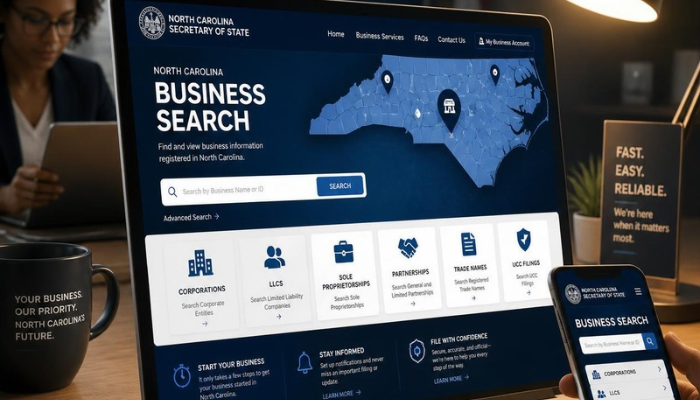
The NC Secretary of State business search lets you look up public registration records for businesses registered with North Carolina. You can use it to find a company’s legal name, SOSID, registration status, formation date, registered agent, addresses, company officials, and filing information.
The official search is provided by the North Carolina Secretary of State’s Business Registration Division. It is useful when you want to verify a business record, research an LLC or corporation, check filing information, investigate a registered agent, or research a business name before forming an entity.
What Is the NC Secretary of State Business Search?
The NC Secretary of State business search is an online database used to search North Carolina business registration records.
The database covers business entities registered with the North Carolina Secretary of State. Depending on the entity and record, a business profile can contain information such as its legal name, SOSID, status, formation date, registered agent, addresses, company officials, and filings.
The search can also be used to locate assumed business names, commonly called DBAs.
The North Carolina Secretary of State says its online search tools are designed for interactive, real-time use. The state also provides separate data subscription services for people who need bulk public data.
Where Can You Find the Official NC Business Search?
The safest place to start is the official North Carolina Secretary of State website.
Go to the Business Registration section and use the Business Registration Search tool.
The search page allows you to enter an organizational name and select search options. The state also provides options related to assumed names and new companies or changes.
If you are researching a company, using the official state database is preferable to relying only on third-party business directories because the Secretary of State maintains the underlying state registration records.
How to Search for a Business in North Carolina
Searching for a business is straightforward, but using the right search method can make a major difference.
Step 1: Open the NC Business Registration Search
Start with the North Carolina Secretary of State’s Business Registration search.
Step 2: Enter the Business Name
Enter the company’s name in the organizational-name field.
If you know the exact legal name, begin with that name.
For example, if you are looking for a company called:
Example Technology LLC
you can start by searching for the distinctive part of the name.
Step 3: Try Different Search Options
If an exact search does not produce the expected result, try a broader name search.
North Carolina’s guidance explains that searching by options such as a name that starts with certain words or contains all words can be useful when you are not completely certain of the entity’s exact legal name.
This matters because registered business names can differ in small ways.
For example:
- Example Technology LLC
- Example Technologies LLC
- Example Technology Group LLC
may represent different entities.
Step 4: Review the Results
Look through the returned businesses and identify the entity that matches the company you are researching.
Do not assume that the first similar-looking name is automatically the correct company.
Compare information such as:
- Legal name
- Entity type
- Status
- SOSID
- Formation date
- Registered agent
- Location
Step 5: Open the Business Profile
Select the appropriate business record to view additional information.
A business profile can provide substantially more information than the initial search-result page.
What Information Can You Find in an NC Business Record?
The amount of information depends on the entity and its filings, but business registration records can contain several useful categories.
Legal Business Name
This is the name registered with the North Carolina Secretary of State.
It may differ from a company’s public-facing brand.
For example, a business could operate under a brand name while having a different legal entity name.
SOSID
The Secretary of State Identification Number, commonly called the SOSID, is an identifier associated with a business entity in the North Carolina registry.
It is useful when you need to distinguish one company from another with a similar name.
Business Status
The record displays the entity’s registration status.
Status information is important because simply finding a company in the database does not necessarily mean that it is currently active.
Date Formed
The business profile can show when the entity was formed or registered.
For foreign entities, the record can also contain information about the entity’s home jurisdiction.
Registered Agent
The registered agent is the person or business designated to receive certain legal notices and other service of process for the entity.
North Carolina’s guidance explains that the registered agent has a duty to forward notices, process, or demands served on the agent to the business entity.
Business Addresses
A business record may contain multiple addresses, including:
- Principal office
- Registered office
- Mailing address
- Registered mailing address
These addresses can serve different purposes, so they should not automatically be treated as the company’s physical operating location.
Company Officials
Business records can also contain officers, managers, members, directors, partners, or other company officials depending on the entity type and information filed with the state.
The North Carolina Secretary of State’s public data description specifically identifies officers, partners, directors, and company officials among the information contained in Business Registration data.
Filing History
A company profile can also provide access to filings associated with the entity.
This can help you understand how the company’s registration has changed over time.
How to Look Up an LLC in North Carolina
An LLC can be searched through the same NC Secretary of State Business Registration system.
Search the LLC’s legal name and review the matching result.
A typical LLC profile can include:
| Information | What It Helps You Understand |
|---|---|
| Legal name | Official registered name |
| SOSID | State identification number |
| Status | Current registration condition |
| Date formed | When the entity was formed |
| Registered agent | Who receives official service |
| Principal office | Business address on record |
| Company officials | People or entities listed in the record |
| Filings | Documents and registration activity |
For example, an official NC business profile can display an LLC’s legal name, SOSID, status, citizenship, formation date, registered agent, addresses, and company officials.
The important point is that an LLC lookup is not limited to checking whether the name exists. The detailed profile can provide additional information useful for due diligence.
How to Check a North Carolina Business Status
After finding a company, check its status carefully.
A business appearing in the database does not automatically mean it is currently operating normally.
For example, an entity may have a status indicating that it is active, dissolved, withdrawn, or subject to another registration condition.
Current-Active
A Current-Active status indicates that the entity is currently shown as active in the state business registry.
Administrative Dissolution
A domestic North Carolina entity can be administratively dissolved when it fails to meet certain statutory requirements.
Failure to file required annual reports is one situation that can lead to administrative dissolution.
Administrative Revocation
Foreign entities authorized to conduct business in North Carolina can face administrative revocation.
North Carolina distinguishes between reinstatement for domestic entities and requalification for foreign entities after these types of administrative actions.
Why Status Matters
If you are evaluating a business for a contract, partnership, purchase, vendor relationship, or other transaction, do not stop after finding the company name.
Check its current status and review relevant filings.
What Does the SOSID Number Mean?
SOSID stands for Secretary of State Identification.
It is the identification number assigned to an entity in the North Carolina business registry.
Think of it as a registry identifier rather than a federal tax identification number.
The SOSID is particularly useful when multiple businesses have similar names.
For example, searching for:
ABC Consulting
could potentially produce several results.
If you already know the company’s SOSID, you have a more precise identifier for the record you are trying to locate.
SOSID vs. EIN
These numbers should not be confused.
| Number | Issued By | Main Purpose |
|---|---|---|
| SOSID | North Carolina Secretary of State | State business registry identification |
| EIN | IRS | Federal tax identification |
| NC tax account information | North Carolina tax authorities | State tax administration |
An SOSID does not replace an EIN.
How to Find a Registered Agent in North Carolina
The registered agent is generally shown on the business’s Secretary of State record.
Open the business profile and look for the registered-agent section.
North Carolina permits certain individuals and business entities to serve as registered agents, subject to the state’s requirements.
The registered office is the location associated with the registered agent for official service.
Registered Agent vs. Business Address
These are not necessarily the same thing.
A registered office is maintained for purposes connected with the entity’s registered-agent requirements.
A principal office may represent the business’s principal location in its state records.
Therefore, you should not automatically assume that the registered-agent address is where the company’s employees or operations are located.
How to Search for a DBA or Assumed Business Name
North Carolina uses the term assumed business name for registrations involving names used by individuals or entities other than their legal name.
For example, a sole proprietor named John Smith could operate under a business name such as:
Smith Lawn Maintenance
rather than simply using John Smith.
A company can also register an assumed name when conducting business under a name different from its registered legal name.
North Carolina maintains a statewide searchable database for assumed business-name filings made on or after December 1, 2017.
For filings made before that date, the state says users may need to search the appropriate Register of Deeds office.
This distinction is important when researching an older DBA record.
How to Check a Business Name Before Forming an LLC
The NC business search is also useful when researching a proposed company name.
Suppose you want to form:
Blue Ridge Digital LLC
Before filing, search the North Carolina registry for:
- Blue Ridge Digital
- Blue Ridge Digital LLC
- Blue Ridge
- Similar names
- Alternative spellings
Do not rely on one exact-match search.
North Carolina follows rules concerning whether business names are distinguishable on the state’s records. Small differences between names can matter.
A search can help identify potential conflicts, but finding no obvious matching name should not be treated as a guarantee that a proposed name will be accepted.
If you are actually forming an entity, review the current North Carolina naming requirements and filing rules before submitting documents.
How to Check Annual Reports
Annual reports are an important part of maintaining certain North Carolina business registrations.
North Carolina states that Business Corporations, LLCs, LLPs, and LLLPs generally have annual-report requirements, subject to applicable exceptions.
For LLCs, the annual report is due on April 15 of each year after the year of creation.
The state currently lists a $200 annual-report fee for an LLC, with an additional electronic transaction fee when applicable.
Business corporations have a different due-date structure based on their fiscal year.
Therefore, do not assume that every business entity has the same annual-report deadline.
Why Annual Reports Matter
Annual reports can provide updated company information and help maintain the entity’s registration.
A business that repeatedly fails to meet required filing obligations may face administrative action.
If you are checking a company for due diligence, reviewing its recent filings can provide more context than looking at the name and status alone.
How to Find a Business’s Filing History
After locating the business profile, look for its available filings.
Depending on the entity, the history may include documents related to:
- Formation
- Amendments
- Annual reports
- Registered-agent changes
- Address changes
- Mergers
- Dissolution
- Reinstatement
- Other business-registration actions
Reviewing filings chronologically can help explain why the company’s current record looks the way it does.
For example, if an address shown today differs from an older address, the filing history may help explain when the change occurred.
What Is a Certificate of Existence?
A Certificate of Existence is an official certificate issued by the North Carolina Secretary of State that provides information about the existence and status of a business entity.
It is different from simply viewing a company’s online profile.
The Secretary of State provides an official process for ordering certificates and lists a current Certificate of Existence fee for eligible business entities.
A Certificate of Existence may be requested for certain business, financing, licensing, banking, or transaction-related purposes.
You should always check the current state fee and requirements before ordering one.
Domestic vs. Foreign Businesses in North Carolina
The terms domestic and foreign can be confusing.
In the context of the North Carolina business registry:
- A domestic entity is generally one formed under North Carolina law.
- A foreign entity is generally formed in another state or jurisdiction and registered or authorized to conduct business in North Carolina.
“Foreign” does not mean that the company is based outside the United States.
For example, an LLC formed in another U.S. state can be a foreign entity when it registers to conduct business in North Carolina.
What to Do If You Cannot Find a Business
Not finding a business on your first search does not necessarily prove that it does not exist.
Try these steps:
1. Check the spelling
A small spelling difference can prevent an exact search from producing the expected result.
2. Remove the business suffix
If you searched:
Example Company LLC
try:
Example Company
3. Use a broader name search
Try a search option that looks for names starting with or containing relevant words.
4. Search the assumed-name records
The company may be operating under an assumed business name.
5. Check whether it is a foreign entity
An out-of-state company registered in North Carolina may have a different legal name or home-state name.
6. Consider the date
Older assumed-name records may require checking the Register of Deeds because the statewide online assumed-name database covers filings made on or after December 1, 2017.
7. Verify the business type
You may be looking for a business record when the relevant information is actually maintained in another state or government database.
Common Mistakes When Using the NC Business Search
Mistake 1: Searching only the exact name
Business names can contain punctuation, abbreviations, suffixes, or other differences.
Mistake 2: Assuming a search result means the company is active
Always check the status.
Mistake 3: Confusing SOSID with EIN
They are issued by different authorities for different purposes.
Mistake 4: Treating a registered-agent address as the operating location
The registered office and principal office can serve different purposes.
Mistake 5: Ignoring filing history
A current profile provides useful information, but historical filings can add important context.
Mistake 6: Assuming an available name is automatically approved
A preliminary database search is useful when researching a proposed name, but it is not the same thing as receiving formal approval.
Mistake 7: Paying a private company for basic search information
The NC Secretary of State provides an official online search tool. The state also warns about misleading mailings and solicitations that use public business information while charging businesses for services they may not need.
What the NC Business Search Does Not Tell You
The Secretary of State business registry is valuable, but it should not be treated as a complete profile of a company.
A business-registration search does not automatically establish:
- The company’s current financial condition
- Whether the business is profitable
- Whether every license or permit is current
- Whether the company has complied with every federal requirement
- Whether the company has outstanding debts
- Whether every public-facing claim made by the business is accurate
- Whether the company is currently operating from the listed address
The registry primarily concerns information maintained through the state’s business-registration system.
For serious due diligence, you may need additional sources such as licensing agencies, court records, tax authorities, professional boards, property records, or federal databases depending on what you are investigating.
NC Secretary of State Business Search for Due Diligence
The business search can be one part of a broader due-diligence process.
For example, suppose you are considering entering a contract with an unfamiliar company.
You could use the NC business registry to check:
- Whether the entity appears in the state registry.
- Its exact legal name.
- Its SOSID.
- Its current status.
- Its formation date.
- Its registered agent.
- Its listed addresses.
- Its company officials.
- Its available filings.
- Whether the information is consistent with documents supplied by the company.
If the company gives you the name ABC Services Inc., but the state record shows a substantially different legal entity, that difference deserves further investigation.
The search itself does not determine whether a company is trustworthy. It gives you official registration information that can be compared with other evidence.
NC Business Search vs. Other Business Information
Different government databases answer different questions.
| Question | Appropriate Resource |
|---|---|
| Is an entity registered in NC? | NC Secretary of State |
| What is its SOSID? | NC Secretary of State |
| Who is its registered agent? | NC Secretary of State |
| What filings are on its state record? | NC Secretary of State |
| What is its federal tax ID? | IRS/business records, where legally available |
| State tax information? | North Carolina Department of Revenue |
| Professional licensing? | Relevant North Carolina licensing board |
| Assumed business name? | NC assumed-name records/Register of Deeds depending on filing date |
| UCC filing information? | NC Secretary of State UCC system |
This distinction helps prevent the common mistake of expecting one database to answer every business-related question.
Is the NC Secretary of State Business Search Free?
The online business search is available as a public search tool through the North Carolina Secretary of State.
However, some additional services and documents can involve fees.
For example, the state publishes separate fees for business filings, annual reports, certificates, and other services.
Therefore, searching a business record and ordering an official document are not necessarily the same thing.
Always check the current fee schedule before placing an order.
Can You Search North Carolina Businesses by Registered Agent?
North Carolina provides business-registration search capabilities beyond simply searching a company name.
This can be useful when researching a registered agent associated with multiple entities.
For professional research, however, make sure you understand exactly what the search field represents and whether you are searching the current registry information or historical records.
Can You Search NC Businesses in Bulk?
The standard online search is designed for interactive use.
The North Carolina Secretary of State specifically states that automated or scripted searches may degrade system performance and are not permitted through the normal interactive search tools.
For bulk public data, the state provides Data Subscription Services.
The Business Registration data available through those services includes information such as entity names, home-state names, contact and address information, domestic or foreign status, company officials, registration status, filings, stock information on file, and name reservations.
The state says this data is updated weekly.
If you need large-scale business data, use the state’s designated data-access process rather than attempting to automate the normal search interface.
Final Takeaway
The NC Secretary of State business search is the primary starting point for researching business registration records in North Carolina.
For a basic lookup, search the company’s name and open the matching business profile. For more detailed research, examine the SOSID, status, formation date, registered agent, addresses, company officials, and filing history.
If you are checking a potential business name, researching an LLC, verifying a company’s registration, or performing preliminary due diligence, do not rely solely on the name appearing in the database. The details and current status of the record provide much more useful context.
FAQ Section
What is the NC Secretary of State business search?
It is the North Carolina Secretary of State’s online tool for searching business registration records. It can be used to find information about registered business entities and related filings.
How do I look up an LLC in North Carolina?
Search the LLC’s name through the NC Secretary of State Business Registration search. Open the matching record to review information such as its SOSID, status, formation date, registered agent, addresses, officials, and filings.
Is the NC business search free?
The public business search is available online. However, certain filings, certificates, and other services may have fees.
What is an SOSID in North Carolina?
An SOSID is the identification number associated with an entity in the North Carolina Secretary of State’s business registry.
How can I check if a business is active in North Carolina?
Search for the business and review its current status in the Secretary of State record. Do not assume that simply finding the business name means that it is currently active.
How do I find a registered agent in North Carolina?
Search for the business in the NC Secretary of State Business Registration database and review the registered-agent section of its profile.
Can I search for a DBA in North Carolina?
Yes. North Carolina provides a statewide searchable database for assumed business names filed on or after December 1, 2017. Older filings may require research through the appropriate Register of Deeds office.
Can I check whether an LLC name is available in North Carolina?
The business search can help you identify existing names and potential conflicts. However, a database search should not be treated as a formal guarantee that a proposed name will be approved.
What is the difference between an SOSID and an EIN?
An SOSID identifies an entity within the North Carolina business registry. An EIN is a federal tax identification number issued by the IRS.
What should I do if I cannot find a North Carolina business?
Check the spelling, remove the legal suffix, try a broader name search, look for an assumed business name, and consider whether the company is registered as a foreign entity.
What is a Certificate of Existence?
A Certificate of Existence is an official document issued by the North Carolina Secretary of State that provides evidence concerning an entity’s existence and status.
See also: Neicke