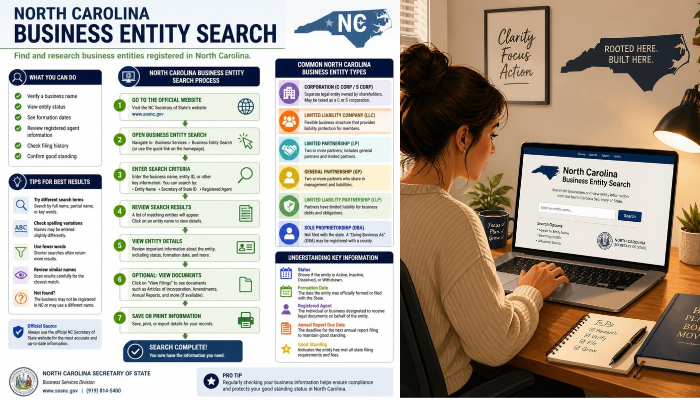
The North Carolina business entity search lets you look up registered businesses through the North Carolina Secretary of State’s Business Registration system. You can use it to find an LLC, corporation, nonprofit, partnership, or other registered entity and review information such as its legal name, SOSID, status, registered agent, addresses, officials, and filing history.
For most searches, start with the North Carolina Secretary of State’s Business Registration search. If you do not know the exact legal name, try a partial name or another available search method. North Carolina’s own guidance recommends using options such as “Name starting with” or “Name contains all words” when you are uncertain about the exact entity name.
This guide explains how the search works, what information you can find, how to understand business statuses, how to search for LLCs and corporations, and what to do when a company does not appear in the results.
What Is the North Carolina Business Entity Search?
The North Carolina business entity search is the state’s online system for searching business-registration records maintained by the Secretary of State’s Business Registration Division.
The database can help you locate registered entities and review information maintained in their public records. The Secretary of State provides online search tools for interactive, real-time use.
Depending on the entity and available records, a business profile can contain information such as:
- Legal business name
- Previous legal name
- SOSID
- Entity type
- Business status
- Domestic or foreign designation
- Formation date
- Registered agent
- Registered office
- Registered mailing address
- Principal office
- Mailing address
- Company officials
- Filing history
For example, an actual North Carolina LLC profile can display its legal name, SOSID, status, citizenship, formation date, registered agent, addresses, officials, and available filing actions.
How to Search North Carolina Business Entities
The basic search process is straightforward.
1. Open the North Carolina Business Registration Search
Go to the North Carolina Secretary of State’s Business Registration section and open the business search tool.
The official system provides a Business Registration search interface where you can enter organizational or individual information depending on the search type.
2. Choose What You Want to Search
The search system allows you to search business-registration records using different types of information.
Depending on your goal, you may search by:
- Organizational name
- Official
- Registered agent
- Other available business-record fields
- SOSID when you already know the entity identification number
The Secretary of State’s guidance also explains how registered-agent searches can be used to identify entities associated with a particular agent.
3. Enter the Business Information
If you know the company’s legal name, enter it in the organizational-name field.
If you are unsure about the exact spelling, do not immediately assume the business is unregistered.
Try a shorter version of the name or use a broader search option.
For example, if you are looking for:
Carolina Technology Solutions LLC
you could begin with:
Carolina Technology Solutions
This can help you find the record even if the legal name or entity ending is slightly different.
4. Review the Search Results
The search results may contain multiple businesses with similar names.
Compare:
- Legal name
- Entity type
- Status
- SOSID
- Location
- Other identifying information
Do not select the first result simply because the name looks similar.
5. Open the Business Record
Click the appropriate entity to open its profile.
The profile provides much more useful information than the initial search-results page.
This is where you can inspect the company’s status, formation information, registered agent, addresses, officials, and available filings.
What Information Can You Find in a North Carolina Business Record?
A North Carolina business profile can provide several useful pieces of information.
Legal Name
This is the business’s registered legal name in the state database.
It may differ from the name used on a website, storefront, social-media account, or marketing materials.
SOSID
The SOSID is the identification number associated with the entity in the North Carolina Secretary of State system.
If you already know the SOSID, it can be more precise than searching by a common business name.
Entity Type
The record identifies the type of entity.
Examples include:
- Limited Liability Company
- Business Corporation
- Nonprofit Corporation
- Limited Partnership
- Limited Liability Partnership
- Professional entities
The exact information displayed depends on the entity and its registration record.
Status
The status tells you how the entity currently appears in the state registry.
This is one of the most important fields to review when checking a company.
Formation Date
The profile may show when the entity was formed or registered.
This can help distinguish companies with similar names.
Registered Agent
A registered agent receives certain official notices, process, or demands on behalf of the business.
North Carolina requires a registered agent and registered office for entities that must maintain them. The Secretary of State explains that the registered office must be a physical North Carolina location where the agent can receive service of process.
Business Addresses
Depending on the record, you may see:
- Registered office
- Registered mailing address
- Principal office
- Mailing address
These addresses do not necessarily mean the company operates a public storefront at that location.
Company Officials
Entity records can also list officials, managers, members, or other people associated with the entity, depending on the entity type and information required in its filings.
Filing History
The profile may provide access to documents and previous filings.
Reviewing filings can help you understand changes to the company’s record over time.
How to Search by Business Name
Business-name searching is the most common way to use the North Carolina registry.
Start with the name you know.
If you get the expected result, open the record and verify the details.
If you do not find the company, try these approaches:
- Remove “LLC” or “Inc.”
- Search fewer words.
- Try the first one or two important words.
- Use a “Name starting with” search.
- Use a “Name contains all words” search.
- Check for punctuation or spelling differences.
- Search by registered agent if you know the agent.
- Search using the SOSID if you have it.
North Carolina’s own search guidance recommends broader name-search approaches when you are not certain of the exact legal name.
Why the Exact Business Name May Not Work
Business names are not always searched the same way people type them in everyday life.
For example, a company might be legally registered as:
Blue Ridge Consulting Group LLC
while its website may simply say:
Blue Ridge Consulting
The database record uses the registered legal name, not necessarily the company’s preferred marketing name.
North Carolina also applies rules concerning whether entity names are distinguishable on the state’s records. Entity endings such as “LLC” or “Inc.” are not necessarily what makes two names distinguishable.
How to Search by SOSID
If you have the company’s SOSID, use it whenever possible.
An SOSID is useful because two businesses can have similar names, while an individual state identification number points to a specific entity record.
You might obtain an SOSID from:
- A previous business record
- A filing
- A contract
- An official state document
- A previous registry search
Once you locate the entity, verify the legal name and status before relying on the record.
How to Search by Registered Agent
The North Carolina business-registration system can also be used to search for entities associated with a registered agent.
This can be useful when you know the registered agent but not the company name.
For example, a professional registered-agent service may represent multiple companies.
North Carolina’s Business Registration Manual explains that users can select “Registered Agent” in the search field and enter the agent’s name.
Keep in mind that differences in punctuation, initials, names, or addresses can produce separate search results.
How to Search for an LLC in North Carolina
To look up an LLC, search the North Carolina Business Registration database by the company’s name or another available identifier.
After finding the record, check:
- Legal LLC name
- SOSID
- Status
- Date formed
- Domestic or foreign designation
- Registered agent
- Registered office
- Principal office
- Company officials
- Filing history
A North Carolina LLC record can also provide links for actions such as viewing filings and filing an annual report.
What Does “Domestic LLC” Mean?
A domestic LLC is generally an LLC formed under North Carolina law.
What Does “Foreign LLC” Mean?
A foreign LLC is an LLC formed outside North Carolina that is registered or otherwise authorized to conduct business in North Carolina when registration is required.
A foreign entity’s record can contain both North Carolina information and information relating to its home state or jurisdiction.
How to Search for a Corporation in North Carolina
The same general business-registration search can be used to locate North Carolina corporations.
When reviewing a corporation, pay attention to:
- Legal name
- SOSID
- Status
- Formation information
- Registered agent
- Registered office
- Principal office
- Officers
- Filing history
Corporations and LLCs do not necessarily have identical filing requirements, so do not assume information that applies to one entity type automatically applies to another.
How to Understand North Carolina Business Statuses
The status field is important because simply finding a company in the database does not tell you whether its record is currently in good standing.
North Carolina’s official guidance defines several status terms.
Current-Active
Current-Active means the entity is current on required documents and active on the North Carolina Business Registry.
This is generally the status a user wants to see when checking whether an entity is currently active in the registry.
Active/Not Current
This status indicates that the entity is still considered active on the registry but is delinquent on one or more required filings.
This distinction matters.
An entity appearing as active does not necessarily mean every required filing is current.
Suspended
A suspended entity has been suspended following notification from the North Carolina Department of Revenue.
The Secretary of State explains that documents generally cannot be filed for an entity with this status, except for a Statement of Resignation of Registered Agent.
Multiple
“Multiple” can indicate that more than one applicable status applies to the entity.
For example, an entity may have an administrative dissolution or revocation together with a suspension.
Revoked
A revoked entity has gone through the administrative revocation process without filing the required filings and a Certificate of Administrative Revocation has been issued.
Dissolved
A dissolved entity has filed Articles of Dissolution and is no longer active on the North Carolina Business Registry.
Withdrawn
A withdrawn status can apply to a foreign entity that no longer wants to conduct business in North Carolina and withdraws its authority to do business in the state.
How to View North Carolina Business Filing History
Finding a company is only the first step.
If you are doing due diligence, open the entity’s filing history and review the documents available in the record.
Depending on the entity, filings may help you identify:
- Original formation documents
- Amendments
- Annual reports
- Changes to registered agents
- Changes to addresses
- Name changes
- Dissolution-related filings
- Other official filings
The North Carolina registry provides a “View Filings” function on applicable entity profiles.
Why Filing History Matters
Suppose a company claims that it has operated under its current legal name for many years.
Instead of relying only on the company’s website, you can examine its state record and formation date.
Likewise, if you are trying to determine whether the business changed names or agents, the filing history may provide useful evidence.
Can You Search North Carolina DBA or Assumed Business Names?
Yes.
North Carolina refers to these as assumed business names.
An assumed business name can be different from the legal name of the underlying business.
For example, a legal company might operate publicly under a different business name.
North Carolina established a statewide searchable assumed-business-name database for filings made on or after December 1, 2017.
This is important because searching only the main business-entity database may not tell you everything about a name a business uses publicly.
Important limitation
The statewide assumed-business-name database does not contain every historical assumed-name filing.
The Secretary of State says that assumed-business-name filings made before December 1, 2017 must be researched through the applicable Register of Deeds office.
How to Check North Carolina Business Name Availability
If you are planning to create an LLC or corporation, searching the existing registry is an important first step.
Search the proposed name and look for businesses with identical or potentially similar names.
North Carolina requires an entity name to be distinguishable on the Secretary of State’s records from the name of another entity on the business registry.
However, finding no obvious match should not be treated as an absolute guarantee that your preferred name will be accepted.
A name may involve additional legal requirements, restricted words, entity-specific rules, or other considerations.
The Secretary of State specifically advises users to search the registry when evaluating whether a name is available.
A Practical Name-Search Method
Before filing, search:
- Exact proposed name
- Name without “LLC”
- Name without “Inc.”
- First two major words
- Similar spellings
- Singular and plural versions
- Common abbreviations
Then review potentially similar records rather than checking only for an exact match.
What Does “Name Contains All Words” Mean?
North Carolina provides search options designed to help users find businesses even when they do not know the exact legal name.
A “Name contains all words” search can be useful when the business name contains several words but you are uncertain about the precise order or formatting.
For example, if you remember that a business includes:
Carolina / Digital / Solutions
a broader search can help identify records containing those words.
The state’s General Counsel guidance specifically recommends broader name searches when the exact legal name is uncertain.
Why Can’t I Find a Business in the NC Registry?
There are several possible explanations.
The name is different
You may know the company’s brand name rather than its registered legal name.
The business uses an assumed name
A DBA or assumed business name may not be identical to the legal entity name.
The spelling is different
A punctuation difference, abbreviation, or wording difference can affect your search.
You are searching the wrong registry
Some records belong to other government agencies or databases.
The business is not an entity required to appear there
Not every business structure is registered with the North Carolina Secretary of State.
The Secretary of State’s General Counsel guidance specifically notes that sole proprietorships and general partnerships are among the types of businesses that may not be found in the Business Registration database. It also notes that some foreign businesses can fall under exceptions to registration requirements.
The record has changed
A company may have changed its name, dissolved, merged, withdrawn, or otherwise changed its registration status.
How to Use a Business Entity Search for Verification
The North Carolina business search can be useful for basic business verification.
Suppose you are considering a contract with a company called:
Example Construction LLC
You can search the company and compare the information with what the company provided.
Check:
- Legal name
- SOSID
- Entity type
- Status
- Formation date
- Registered agent
- Address
- Officials
- Filing history
Example Verification Scenario
Imagine a vendor gives you the following information:
Example Construction LLC
North Carolina
You search the registry and find several similar businesses.
One is:
Example Construction Group LLC
Another is:
Example Construction Services Inc.
Do not assume either one is the vendor you are dealing with.
Compare the legal name, SOSID, address, and other identifying information.
This simple step can prevent confusion between businesses with similar names.
Is the North Carolina Business Entity Search the Same as a Business License Search?
No.
A business entity record and a professional or industry license are different types of information.
The Secretary of State database primarily concerns business-registration records.
Depending on the business, you may also need to verify licenses through the relevant North Carolina regulatory agency or professional board.
For example, a professional service provider may have requirements beyond simply registering a business entity.
Therefore, an entity search should not automatically be treated as proof that a business holds every license, permit, or authorization it may need.
North Carolina Business Search vs. UCC Search
The North Carolina Secretary of State also provides a Uniform Commercial Code (UCC) search.
A UCC search is different from a standard business-entity search.
A business-entity search is primarily used to investigate an entity’s registration record.
A UCC search concerns UCC filings and related secured-transaction records.
The Secretary of State maintains a separate UCC search interface with fields for organizational names, individual names, addresses, entity type, and filing dates.
If your goal is simply to find an LLC or corporation, start with the Business Registration search rather than the UCC database.
What Is a Registered Agent?
A registered agent is the person or eligible business entity designated to receive official notices, service of process, and certain other legal documents for a registered entity.
North Carolina states that the registered agent’s duty includes forwarding notices, process, or demands to the business entity’s last known address.
The registered agent and the company’s owner are not necessarily the same person.
A company can use a professional registered-agent service instead of having an individual owner act as the agent.
What Is a Certificate of Existence?
A Certificate of Existence is an official certificate that can provide formal evidence concerning a business entity’s existence or authorization, depending on the entity and certificate type.
This is different from simply performing a business search.
A registry search is useful for viewing public information.
A certificate may be needed when a bank, lender, contracting party, government agency, or another organization specifically requests formal documentation.
The Secretary of State’s fee schedule currently lists a $15 fee for a Certificate of Existence for an LLC, although users should verify the current fee for their specific entity and order type before paying.
How Do Annual Reports Affect Business Records?
Annual reports are an important part of maintaining an entity’s registration.
For North Carolina LLCs, the annual report is due April 15 each year after the creation year. The Secretary of State currently lists a $200 annual-report fee, with an additional electronic transaction fee when applicable.
Business corporations have a different annual-report schedule. Their reports are generally due on the 15th day of the fourth month following the end of the corporation’s fiscal year.
This is one reason the entity’s status and filing information should be reviewed together.
Can You File an Annual Report From the Business Search?
For applicable entities, yes.
The Secretary of State explains that you can search for the business and then select the annual-report option associated with the entity listing.
The entity profile can also provide an option to file or amend an annual report where applicable.
What Businesses May Not Appear in the Search?
The registry is not a universal database of every business operating in North Carolina.
For example, the Secretary of State notes that sole proprietorships and general partnerships are among the business types that may not be included in the Business Registration database. Some foreign businesses may also fall within exceptions to registration requirements.
This distinction is important when interpreting a “no results” search.
No result does not automatically mean the business does not exist.
It may mean that the business uses another name, operates under a different structure, uses an assumed name, or does not have a record in that particular database.
Common North Carolina Business Search Mistakes
Mistake 1: Searching only the exact brand name
A website name is not always the same as the legal entity name.
Mistake 2: Assuming “no results” means “fake business”
A business may operate under a different legal structure or name.
Mistake 3: Ignoring the status
Finding an entity is not enough.
Check its current status.
Mistake 4: Confusing an assumed name with a legal entity
A DBA or assumed business name is not necessarily the same thing as the legal entity behind it.
Mistake 5: Checking only the first search result
Similar names can belong to completely different businesses.
Mistake 6: Ignoring the SOSID
When two companies have similar names, the SOSID can help distinguish their records.
Mistake 7: Treating the registry as proof of licensing
Business registration does not automatically establish that every required professional license or permit is current.
Mistake 8: Relying on outdated information
Business records can change.
For important decisions, review the current state record and available filings rather than relying on an old screenshot or third-party directory.
A Simple North Carolina Business Search Checklist
When checking a company, use this checklist:
| Information | What to Check |
|---|---|
| Legal name | Does it match the company you are dealing with? |
| SOSID | Is it the correct entity identification number? |
| Entity type | LLC, corporation, nonprofit, partnership, etc. |
| Status | Is the entity currently active or subject to another status? |
| Formation date | Does it match the company’s stated history? |
| Registered agent | Who is listed to receive official notices? |
| Registered office | What North Carolina address is on record? |
| Principal office | What business address is listed? |
| Officials | Who is identified in the state record? |
| Filing history | What filings and changes appear in the record? |
| Assumed name | Does the company operate under another registered name? |
The Bottom Line
The North Carolina business entity search is the starting point for researching businesses registered with the North Carolina Secretary of State.
For a basic lookup, search the business name and open the matching entity record. Then verify the SOSID, entity type, status, formation information, registered agent, addresses, officials, and filing history.
If the company does not appear, broaden the search before drawing conclusions. Try a partial name, another search method, an SOSID, a registered-agent search, or the separate assumed-business-name database.
For business-name planning, remember that finding no identical name is not by itself a guarantee that the proposed name will be accepted. North Carolina applies distinguishability and other naming rules when reviewing entity names.
For important legal, financial, licensing, or contractual decisions, use the official state record and, when necessary, obtain advice from an appropriately qualified professional.
Frequently Asked Questions
How do I search for a business in North Carolina?
Use the North Carolina Secretary of State’s Business Registration search. Enter the business name or another available identifier, review the matching results, and open the entity profile to see its registration information.
Is the North Carolina business entity search free?
The Secretary of State provides online business-registration search tools for public use. Filing documents, annual reports, certificates, and other services can have separate fees.
How do I check if an LLC is registered in North Carolina?
Search the LLC’s name in the North Carolina Business Registration database. Open the matching record and verify the legal name, SOSID, entity type, status, formation date, registered agent, and other available information.
What is an SOSID in North Carolina?
An SOSID is the identification number associated with a business entity in the North Carolina Secretary of State’s records. It can help distinguish a specific entity from businesses with similar names.
How do I find a company’s registered agent in North Carolina?
Search for the business in the Business Registration database and open its entity profile. The registered agent is listed on applicable business records. You can also search the registry by registered-agent name.
What does Current-Active mean in North Carolina?
Current-Active means the entity is current on required documents and active on the North Carolina Business Registry.
What does Active/Not Current mean?
It means the entity is still considered active on the registry but is delinquent on one or more required filings.
Can I search for a North Carolina DBA?
Yes. North Carolina maintains a statewide searchable assumed-business-name database for filings made on or after December 1, 2017. Older filings may need to be researched through the applicable Register of Deeds office.
How do I check if a business name is available in North Carolina?
Search the proposed name in the North Carolina Business Registration database and examine potentially similar names. North Carolina requires entity names to be distinguishable on the Secretary of State’s records, but a database search alone should not be treated as a final legal determination of availability.
Why can’t I find a business in the North Carolina registry?
The business may use a different legal name, operate under an assumed name, have a different entity structure, or fall outside the types of entities maintained in the Business Registration database. North Carolina notes that some sole proprietorships, general partnerships, and certain foreign businesses may not appear.
Can I see a company’s previous filings?
For applicable entities, the profile includes a “View Filings” option that can provide access to documents in the entity’s record.
Is a business search the same as checking a business license?
No. A Secretary of State entity search primarily verifies business-registration information. Professional licenses, permits, and industry-specific authorizations may be maintained by other agencies or boards.
How often should I verify a business?
For ordinary research, checking the current state record may be sufficient. For an important contract, financial transaction, acquisition, or legal matter, review the current record and relevant filings close to the time you make the decision.
See also: NC Secretary of State Business Search: Complete Guide