Businesses increasingly use WhatsApp as a direct communication channel for customer support, reminders, promotions, order updates, and follow-ups. The challenge appears when message volume grows and a team needs more control than a standard WhatsApp workflow can provide.
WaSend is a business communication platform designed to help organizations manage WhatsApp conversations, campaigns, automation, contacts, and analytics from a centralized system. Its official website describes it as an enterprise WhatsApp communications platform powered by the official WhatsApp Business API.
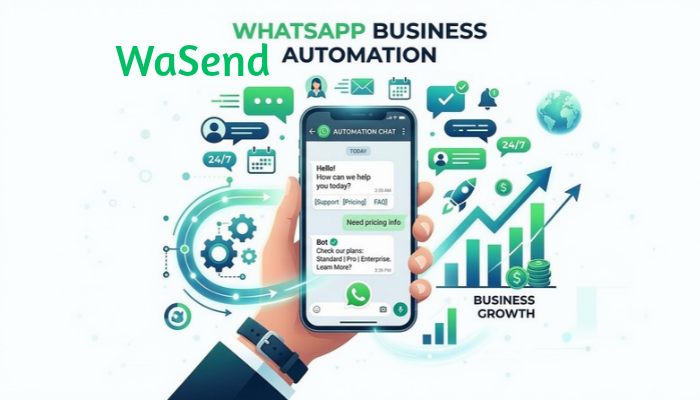
The platform is designed around several common business needs: sending campaigns, allowing multiple team members to manage conversations, automating customer journeys, organizing contacts, and monitoring messaging performance.
This guide explains what WaSend is, how it works, its main features, potential business use cases, and what companies should consider before adopting a WhatsApp automation platform.
What Is WaSend?
WaSend is a WhatsApp-focused business communication and automation platform.
Instead of relying entirely on manual conversations, businesses can use the platform to organize customer communications in one place. The official product information lists features including bulk campaigns, a shared team inbox, visual workflow automation, analytics, mobile access, contact management, and security controls.
The platform is aimed at businesses that communicate with a large number of customers through WhatsApp.
For example, a company could use WhatsApp to:
- Send customer notifications
- Follow up with leads
- Send promotional campaigns
- Handle customer questions
- Send reminders
- Organize customer conversations
- Automate selected communication workflows
- Monitor message performance
The important distinction is that WaSend is positioned as a business communication system, rather than simply a tool for sending individual WhatsApp messages.
How Does WaSend Work?
The basic process is designed to be relatively straightforward.
According to the official WaSend website, businesses can create an account, connect their WhatsApp Business number, upload or import contacts, organize their audience, and then create campaigns or automated communications.
A simplified workflow looks like this:
- Create a WaSend account.
- Connect the appropriate WhatsApp Business setup.
- Import or add contacts.
- Organize contacts into relevant audiences or segments.
- Create message templates or campaigns.
- Configure automation when needed.
- Send communications.
- Monitor delivery, read, and reply activity.
This workflow can reduce the amount of repetitive manual work involved in managing large customer conversations.
Key WaSend Features
Team WhatsApp Inbox
One of the useful features for growing companies is centralized team communication.
WaSend says businesses can use one WhatsApp Business number with multiple agents. Messages can be distributed among team members while maintaining customer conversation history.
This can be useful when customer support is handled by several employees.
For example, an online store may have separate employees handling:
- Order questions
- Returns
- Product information
- Sales inquiries
- General customer support
Rather than forcing every employee to manage conversations separately, a shared inbox can provide a more organized workflow.
Bulk WhatsApp Campaigns
WaSend also supports bulk campaigns.
The official website states that campaigns can be used for communications such as invoice reminders, coupons, and promotional offers, with the platform advertising campaign volumes of more than 100,000 messages.
Large-scale messaging can be useful for businesses that need to communicate with a defined customer audience.
However, scale should not be confused with permission. Businesses should make sure their messaging practices comply with applicable WhatsApp requirements, privacy obligations, and relevant marketing laws.
Visual Automation
WaSend includes a visual automation editor designed around drag-and-drop workflows.
The concept is simple: instead of manually sending every message, businesses can create predefined communication sequences.
Potential examples include:
- Welcome messages
- Customer reminders
- Cart reminders
- Feedback requests
- Follow-up messages
- Customer surveys
Automation can be particularly useful for repetitive communication where the same basic workflow happens repeatedly.
Contact Management
A messaging platform becomes more useful when businesses can organize the people they communicate with.
WaSend’s stated setup supports contact imports through CSV, phonebook, API, or manual entry. The platform also describes segmentation and tagging capabilities.
Segmentation allows businesses to separate audiences according to their needs.
For example:
| Audience | Possible Communication |
|---|---|
| New customers | Welcome message |
| Existing customers | Product updates |
| Recent buyers | Order information |
| Leads | Follow-up communication |
| Returning customers | Promotional offers |
Good segmentation can make business messaging more relevant and easier to manage.
Campaign Analytics
Sending messages is only part of the process.
Businesses also need to understand how their communications perform.
WaSend states that its analytics can track delivery, read, and reply rates and provide campaign performance information.
These metrics can help a business identify whether messages are reaching customers and whether recipients are responding.
For example, if one campaign receives substantially more replies than another, the business can examine factors such as:
- Audience
- Message wording
- Timing
- Offer
- Call to action
- Customer segment
Analytics should therefore be used to understand communication performance rather than simply counting messages sent.
Mobile Access
WaSend also promotes mobile access for campaign management, inbox responses, and contact management. The company says its mobile experience is available for both iOS and Android.
Mobile access can be useful for teams that need to monitor customer conversations away from a desktop workstation.
Security Features
Security is an important consideration when businesses use software to handle customer communication.
WaSend states that it uses AES-256-GCM field-level encryption and per-tenant keys, and lists GDPR and KVKK compliance among its security-related features.
These are vendor-provided claims, so businesses handling sensitive information should review the platform’s current privacy documentation, contractual terms, data-processing arrangements, retention policies, and security documentation before making a purchasing decision.
How Businesses Can Use WaSend
The usefulness of a WhatsApp automation platform depends heavily on how a business communicates with customers.
Here are several practical applications.
Customer Support
Businesses can use a shared inbox to centralize customer conversations.
This can make it easier for support teams to respond to questions without relying on one employee’s personal device or individual conversation history.
A support workflow might look like:
Customer message → Team inbox → Assigned agent → Response → Follow-up
For larger teams, structured routing can make customer communication easier to organize.
Marketing Campaigns
Businesses can also use WhatsApp for promotional communication.
Examples include:
- Product announcements
- Special offers
- Seasonal promotions
- Customer reactivation campaigns
- Event reminders
- Discount notifications
The quality of the audience is important. Sending a highly relevant message to a properly selected customer segment is generally more useful than sending the same message indiscriminately to a large list.
Automated Follow-Ups
Automation can help with repetitive customer journeys.
For example:
New customer → Welcome message → Product information → Follow-up → Feedback request
The exact workflow depends on the business and its communication requirements.
Automation is most useful when the process is predictable and does not require a human decision at every stage.
Reminders
Reminder messages are another practical use case.
Businesses can potentially use automated communication for things such as:
- Appointments
- Orders
- Payments
- Customer follow-ups
- Service notifications
The business should still configure its messaging carefully so customers receive useful information without unnecessary repetition.
WaSend for Customer Support
Customer support is one area where a shared WhatsApp environment can be particularly useful.
Without centralized management, a company may end up with several problems:
- Messages handled by different employees
- Customers waiting for replies
- Duplicate responses
- Difficulty tracking previous conversations
- No clear ownership of conversations
A team inbox can help create a more structured process.
For example, when a customer asks about an order, one employee can respond while another team member can handle a separate sales inquiry.
The goal is not simply to increase the number of messages. It is to make customer communication more organized.
WaSend for Marketing Campaigns
WhatsApp can be an effective direct communication channel when customers expect to hear from a business there.
A campaign might contain:
Offer → Short explanation → Call to action
For example, a business could inform an existing customer about a new product and provide a link to learn more.
Businesses should pay attention to audience relevance, frequency, message quality, and applicable messaging rules.
A large contact list does not automatically mean a successful campaign.
WaSend for Automated Customer Journeys
Customer journeys often contain repetitive steps.
Consider an online store.
A customer might:
- Place an order.
- Receive confirmation.
- Receive an update.
- Receive a delivery notification.
- Receive a follow-up.
- Be invited to provide feedback.
Automation can reduce the amount of manual work required for this sequence.
WaSend’s visual workflow approach is designed to help businesses create this type of automated communication.
The most useful workflows are usually those where the trigger, message, and next step are clearly defined.
How to Get Started With WaSend
The official WaSend workflow describes three basic starting stages:
- Create an account.
- Connect a WhatsApp Business number.
- Import contacts and create campaigns.
Before launching a campaign, businesses should also prepare:
- A clean customer database
- Appropriate audience segments
- Relevant message templates
- Clear calls to action
- Internal support procedures
- Opt-out handling
- Measurement goals
Testing a workflow with a smaller audience before expanding it can also help identify problems.
What Should Businesses Consider Before Using WaSend?
Choosing a WhatsApp automation platform involves more than looking at its feature list.
1. Messaging Compliance
Businesses should understand the applicable WhatsApp Business rules and privacy requirements before sending commercial communications.
Automation should not be treated as a way to bypass messaging restrictions.
2. Contact Quality
A large contact list is not necessarily a valuable contact list.
Businesses should maintain accurate customer information and use appropriate audience segmentation.
3. Message Frequency
Customers can become frustrated when businesses send too many unnecessary messages.
A useful communication strategy should consider frequency and relevance.
4. Data Handling
Businesses should understand:
- Where customer data is stored
- How data is protected
- How long information is retained
- Who can access it
- How data can be deleted
- What privacy documentation applies
5. Team Responsibilities
Automation does not eliminate the need for human support.
Companies should determine who handles customer questions that automation cannot resolve.
WaSend vs Traditional WhatsApp Business Management
The main difference is the level of organization and automation.
| Capability | Basic WhatsApp Management | WaSend-Style Business Platform |
|---|---|---|
| Individual conversations | Yes | Yes |
| Team management | Limited depending on setup | Designed for multiple agents |
| Bulk campaigns | Limited | Supported |
| Workflow automation | Limited | Supported |
| Contact segmentation | Basic | Supported |
| Campaign analytics | Limited | Supported |
| Centralized inbox | Depends on setup | Supported |
| Business automation | Limited | Core use case |
The exact capabilities available can depend on the product version, account configuration, and current service terms.
Common Mistakes When Using WhatsApp Automation
Automation can save time, but poor implementation can create new problems.
Sending to the Wrong Audience
A campaign intended for recent customers should not automatically be sent to every contact.
Over-Automating Customer Service
Some conversations require human judgment.
Businesses should provide a clear path from automated responses to human assistance.
Ignoring Analytics
Sending thousands of messages without reviewing delivery, read, and reply data makes it harder to improve future campaigns.
Using Generic Messages
Personalization does not always require complex technology. Even simple audience segmentation can make messages more relevant.
Focusing Only on Volume
A large campaign is not necessarily a successful campaign.
The real goal should be useful communication and measurable business outcomes.
Is WaSend Suitable for Your Business?
WaSend is positioned for businesses that want to manage WhatsApp communication at a larger scale.
It may be relevant for organizations that need:
- Multiple agents using one business communication setup
- Bulk campaigns
- Automated workflows
- Contact organization
- Campaign analytics
- Centralized customer conversations
- Mobile access
Smaller businesses with very low message volume may not need every automation feature. Larger teams, customer-support departments, ecommerce companies, and organizations with repetitive WhatsApp workflows may have more reasons to evaluate a platform of this type.
The right choice depends on communication volume, team size, automation requirements, budget, compliance needs, and existing business systems.
Final Takeaway
WaSend is a WhatsApp-focused business communication platform designed to combine messaging, campaigns, automation, contact management, team collaboration, and analytics in one environment. Its official product information emphasizes bulk campaigns, shared team communication, visual workflows, analytics, mobile access, and security features.
For businesses managing many WhatsApp conversations, the main value of a platform like WaSend is organization. Instead of handling every interaction manually, teams can build repeatable processes, automate suitable tasks, segment audiences, and monitor communication activity.
Before adopting any WhatsApp automation platform, businesses should also evaluate current pricing, available integrations, data-handling practices, messaging policies, and whether its features match their actual communication needs.
FAQ Section
What is WaSend?
WaSend is a business communication and automation platform focused on WhatsApp. Its official website describes features including bulk campaigns, team inbox functionality, workflow automation, analytics, contact management, and mobile access.
What can WaSend be used for?
WaSend can be used for business messaging, customer support, bulk campaigns, automated workflows, customer follow-ups, contact management, and campaign performance monitoring.
Does WaSend support bulk WhatsApp messages?
Yes. The official WaSend website promotes bulk campaigns and states that its platform can handle campaigns exceeding 100,000 messages.
Can multiple employees use WaSend?
Yes. WaSend says businesses can use one WhatsApp Business number with multiple agents through its team communication functionality.
Does WaSend provide automation?
Yes. WaSend provides a visual automation editor intended for creating workflows such as welcome messages, reminders, and other automated customer journeys.
Does WaSend provide analytics?
Yes. WaSend states that its analytics can track delivery, read, and reply rates and provide campaign performance information.
Is WaSend the same as every tool called WASend?
No. The name is used by several unrelated products and services. Current search results include different WhatsApp tools and an older Android application, so users should verify the exact WaSend product and domain before signing up.
Is WaSend suitable for small businesses?
It can be, depending on the business’s communication needs. A small business with limited WhatsApp activity may not require advanced automation, while a growing business with multiple agents, campaigns, or repetitive workflows may have more use for these features.
See also: Louis Vuitton: The Illustrated World of a Fashion Icon